
A while ago, I had an uncomfortable realization.
Every photo I had taken, birthdays, braais, broken servers, road trips, sunsets, lived on someone else’s computer.
Google Photos is convenient. iCloud is polished. They work. But over time, convenience becomes dependency. Subscriptions stack up. Storage fills up. Compression kicks in. And suddenly your life archive is just another SaaS line item.
When I started building my homelab properly, I told myself something simple:
If I care about it, I host it.
Pangolin helped me expose services safely.
Zerobyte helped me protect my data.
Immich? Immich lets me own my memories.
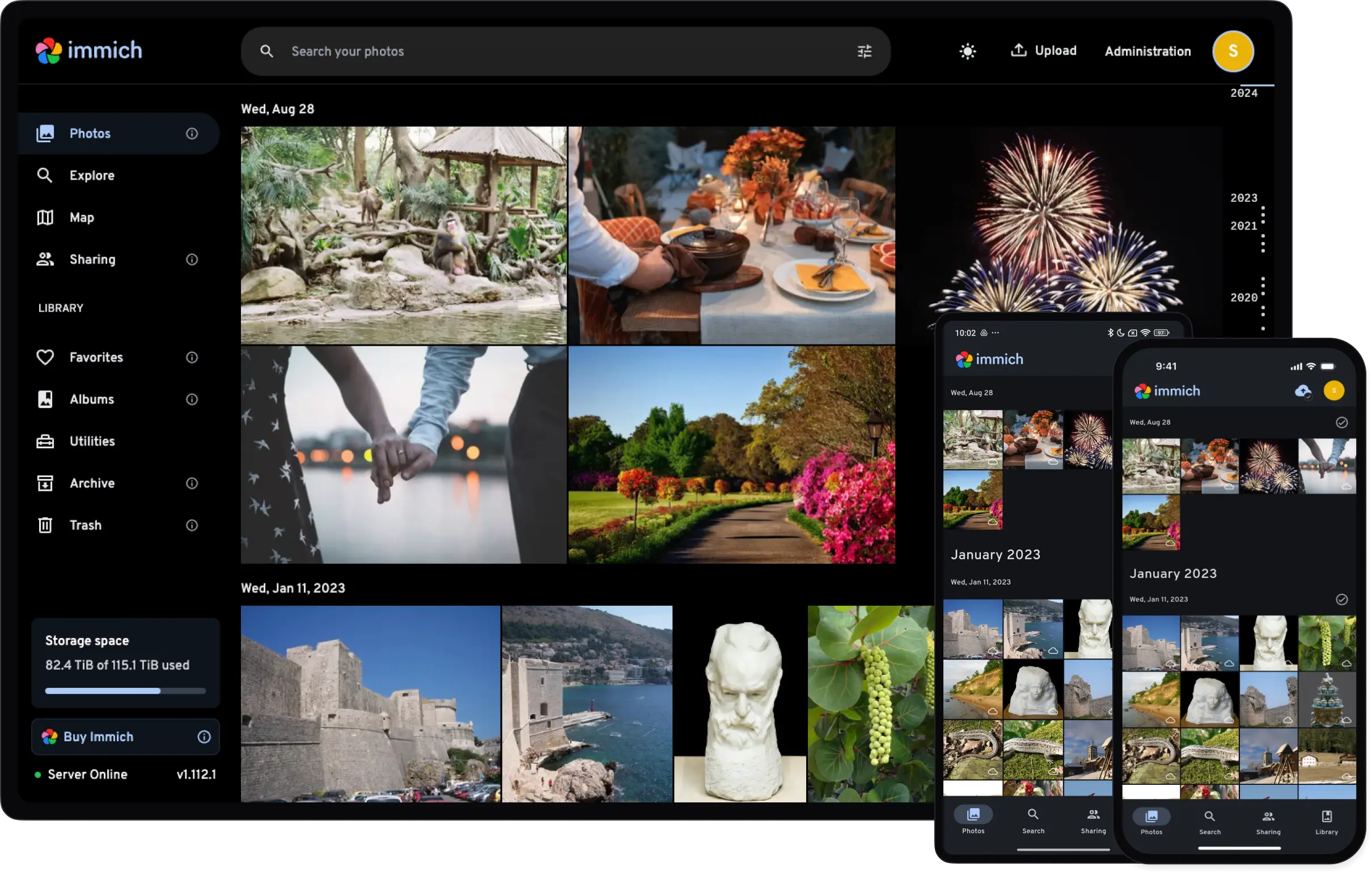
What Is Immich?
Immich is a self-hosted photo and video backup platform designed as a Google Photos alternative, but built properly for modern infrastructure.
This isn’t just a gallery UI slapped on a file browser. It’s a full client-server system with background job processing, machine learning, API-driven design, and proper database separation.
You get:
- Automatic mobile uploads (Android & iOS)
- A clean web interface
- Facial recognition
- Smart search
- Album management & sharing
- Background processing
- Hardware-accelerated transcoding
- A CLI for bulk imports
And most importantly, it’s designed to run in Docker.
For a homelab, that’s perfect.
The Architecture (And Why It’s Actually Interesting)
Immich follows a traditional client-server architecture, but it’s structured in a way that makes it feel production-ready.
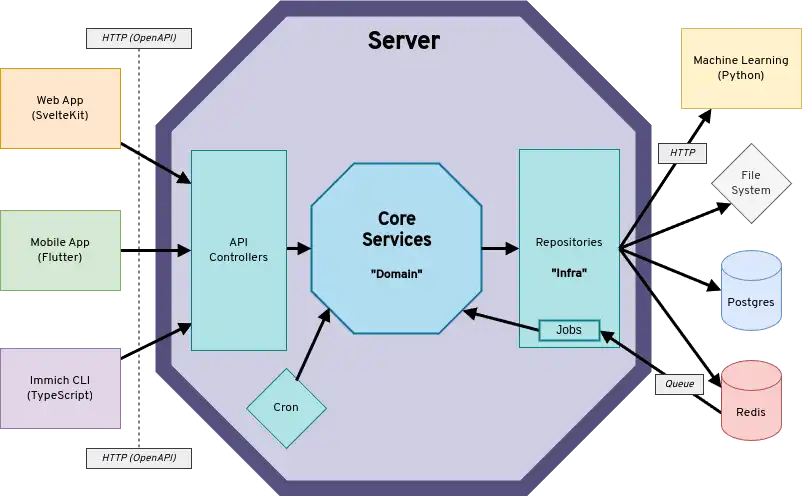
You have three main clients:
- The mobile app (Flutter-based)
- The web app (SvelteKit + Tailwind)
- The CLI (npm package for bulk uploads)
All three communicate with the backend through REST APIs generated from OpenAPI schemas. That means typed endpoints, clean integration, and consistency across platforms.
Behind the scenes, the backend isn’t just one container. It’s several.
There’s immich-server, which handles API requests, authentication, metadata extraction, thumbnail generation, and video transcoding.
There’s immich-microservices, which doesn’t serve API traffic at all. Instead, it processes background jobs pulled from Redis. This separation is important. If you upload 500 photos, your UI remains responsive while background workers process thumbnails and metadata.
Redis manages the job queue using BullMQ. Thumbnail generation triggers smart search. Smart search enables facial recognition. Jobs cascade in a controlled pipeline.
Postgres stores everything that gives your photos meaning: users, albums, metadata, permissions, sharing configuration, ML settings. Lose the database, and your photos become anonymous files.
And then there’s my favorite part, the machine learning service.
It runs as its own container, written in Python using FastAPI. All AI tasks (facial recognition, smart search, embeddings) are isolated there. Models are stored in ONNX format, loaded on demand, cached in memory, and processed using a thread pool to avoid blocking async operations.
Why separate it?
Because ML workloads are heavy. They consume RAM. They may benefit from a GPU. You might want to disable them entirely. Running it independently means you can scale it, move it to another machine, or turn it off without touching the core service.
That’s real architectural thinking.
And that’s why Immich feels serious.
Designing Storage the Homelab Way
In my Zerobyte article, I mentioned repurposing an old DStv Explora HDD for backup storage.
It turns out it’s perfect for Immich too, if you use it correctly.
Immich generates different types of data:
- The Postgres database
- Thumbnails
- Encoded/transcoded videos
- Profile and system data
- Backups
- Original uploaded photos and videos
Not all of these need NVMe speeds.
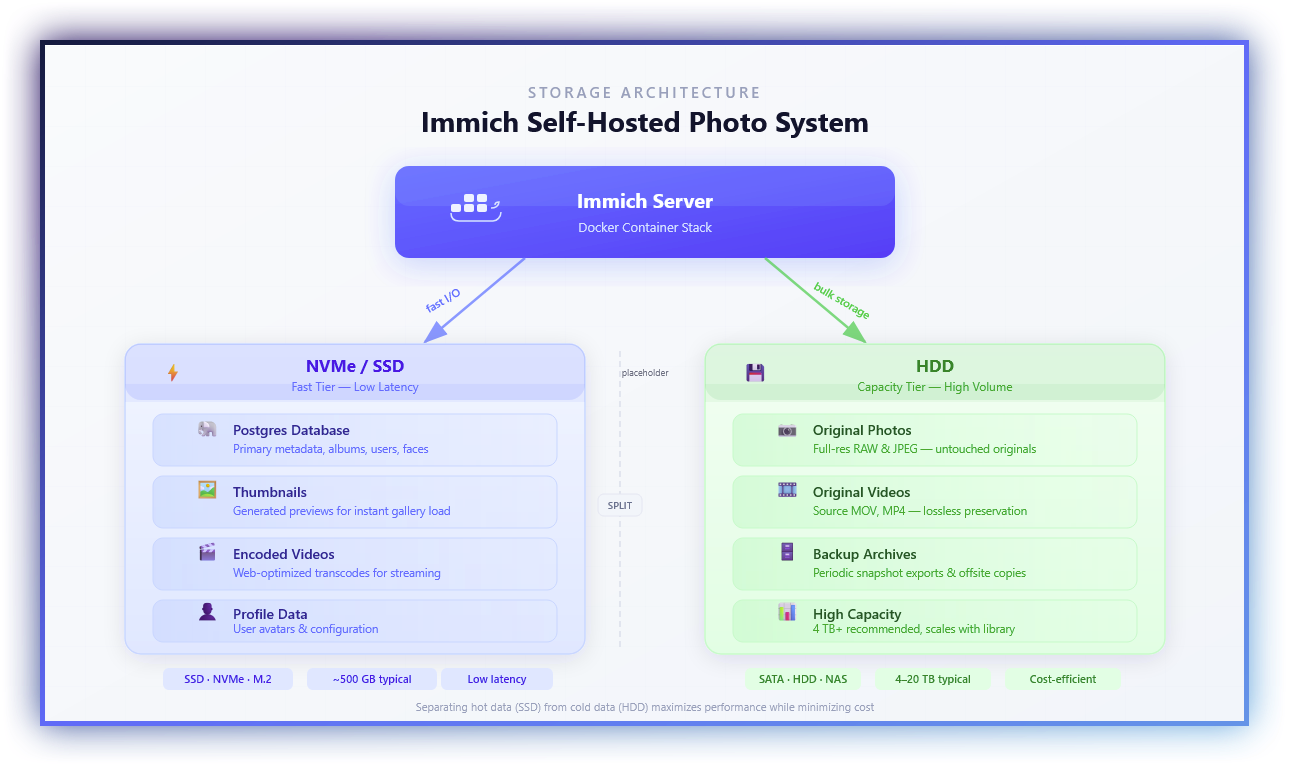
What Belongs on SSD or NVMe
The database, thumbnails, and encoded videos should live on fast storage.
Why?
Because when you scroll your timeline, you aren’t loading 20MB RAW files, you’re loading thumbnails. Constantly. If those thumbnails sit on a slow HDD, your interface feels sluggish.
Postgres also benefits massively from low-latency storage. Queries, indexing, and metadata lookups become instant on NVMe.
Transcoding operations and smart search pipelines also read and write intermediate data frequently.
Fast storage makes Immich feel “cloud-grade.”
What Belongs on HDD
Original uploads.
Photos and videos are large. They’re mostly accessed sequentially. Once thumbnails are generated, the system doesn’t constantly hit the original file unless you open it fully or download it.
That makes spinning disks perfectly acceptable for raw storage.
In my setup:
- NVMe stores Postgres, thumbnails, encoded videos.
- The DStv HDD stores original uploads and backup archives.
That split keeps the UI fast while giving me cheap bulk storage.
And it extends SSD lifespan too.
Installing Immich with Docker Compose
Immich officially recommends Docker Compose for production. For a homelab, that’s ideal.
Create a directory:
mkdir ./immich-app
cd ./immich-app
Download the required files:
wget -O docker-compose.yml https://github.com/immich-app/immich/releases/latest/download/docker-compose.yml

wget -O .env https://github.com/immich-app/immich/releases/latest/download/example.env
Edit your .env file.
Here’s an example if you just have a single storage drive:
UPLOAD_LOCATION=./library
DB_DATA_LOCATION=./postgres

IMMICH_VERSION=v2
DB_PASSWORD=ChangeThisPassword
DB_USERNAME=postgres
DB_DATABASE_NAME=immich
TZ=Africa/Johannesburg
If you want full control over generated files on multiple storage drives (NVMe+HDD), you can define additional paths:
UPLOAD_LOCATION=/mnt/hdd/immich/library
DB_DATA_LOCATION=/mnt/nvme/immich/postgres
THUMB_LOCATION=/mnt/nvme/immich/library/thumbs
ENCODED_VIDEO_LOCATION=/mnt/nvme/immich/library/encoded-video
PROFILE_LOCATION=/mnt/nvme/immich/library/profile
BACKUP_LOCATION=/mnt/hdd/immich/library/backups

IMMICH_VERSION=v2
DB_PASSWORD=ChangeThisPassword
DB_USERNAME=postgres
DB_DATABASE_NAME=immich
TZ=Africa/Johannesburg
Then update the docker-compose.yml to mount them properly inside the immich-server container (no need to add more mount volumes if you haven't defined additional paths):
volumes:
    - ${UPLOAD_LOCATION}:/data
    - ${THUMB_LOCATION}:/data/thumbs
    - ${ENCODED_VIDEO_LOCATION}:/data/encoded-video
    - ${PROFILE_LOCATION}:/data/profile
    - ${BACKUP_LOCATION}:/data/backups
After that:
docker compose up -d
Make sure you’re using docker compose (not docker-compose) and running a recent Docker Engine version.
Once it’s up, initial indexing may spike CPU usage while thumbnails and embeddings are generated. That’s normal.
Backups (Because We Learned That Lesson Already)
Running Immich without backups defeats the entire purpose of self-hosting.
You need to protect two things:
- The upload directory (your actual photos and videos)
- The Postgres database
If you only back up uploads, you lose albums, faces, metadata, and organization.
If you only back up the database, you lose the actual photos.
In my setup, Zerobyte handles both:
- The upload directory on the HDD
- Postgres dumps from the NVMe
- Snapshot copies for versioning
And because I customized storage paths, I made sure Zerobyte points to the new locations.
Never assume defaults.
Living With Immich
After the initial indexing finished, something interesting happened.
I stopped thinking about it.
Photos uploaded automatically from my phone. The timeline felt instant after moving thumbnails to NVMe. Facial recognition improved over time. Search actually worked.
It stopped feeling like “my self-hosted alternative.”
It just felt like my photo system.
And that’s when you know a homelab service is successful.
Why Immich Belongs in a Homelab
Immich isn’t just about photos.
It teaches you:
- Containerized service separation
- Job queue architecture
- Database persistence strategy
- Storage tiering
- ML workload isolation
- Backup discipline
Pangolin let me expose services safely.
Zerobyte let me protect my data.
Immich lets me own my memories.
And that might be the most important service in my entire homelab.